Metronome Watch Special
A precise metronome for Apple Watch. 15 to 240 BPM, 1 to 9 beats per measure, sound and haptics. Switch on Beat with others and multiple watches set to the same tempo play together, with nothing to pair. Keeps playing with your wrist down. No iPhone needed.
Requires watchOS 8 or later.
Download


Support
Have a question, found a bug, or need help with the app? Reach out. We read every message.
Before you write
A few quick things to try first:
- App not responding? Double-press the Digital Crown to see open apps, then swipe the Metronome card up to close it. Reopen from your app list.
- Sound not playing? Check that the Digital Crown volume is turned up. Also check that your watch is not in silent mode.
- Haptics not working? Make sure the ⏚ button is shown (haptics are on). If you see ⚡︎, tap it to enable haptics. Also check Watch Settings → Sounds & Haptics.
- Metronome drifting or stopping? Background audio requires the app to stay active. Try reopening and starting the metronome again.
- Watches sounding out of sync? Make sure Beat with others is switched on for every watch. Check that the tempo and the beats per measure are the same on each one. Even at the same tempo, a different number of beats can put the rhythms out of sync. A watch using Bluetooth headphones can be up to 100 ms behind; close that gap with the delay setting.
Frequently Asked Questions
- Does it work without my iPhone?
Yes, fully standalone. - Does it work when my wrist is down?
Yes, audio and haptics continue. - Does it remember my settings?
Yes. Your last tempo, beats per measure, and haptic setting are restored when you reopen the app. - Can I use it for exercise?
Yes. Tempos from 15 BPM work well for rowing stroke rate, while higher tempos can support running or walking cadence. - How are the watches paired for Beat with others?
They are not paired at all. Each watch works out the beat from its own clock, so there is no pairing, no network, and no connection between them. Everyone sets the same tempo and the same beats per measure, and that is the whole of it. - How many watches can use Beat with others together?
Any number. Nothing is coordinating them, so nothing limits them. With more than two, pick one watch as the reference and have everyone adjust their delay to that one. If each person instead matches whoever is next to them, small differences add up along the chain and the ends drift apart. - The metronome starts late when Beat with others is on. Why?
It waits for the next beat, so it joins the shared count instead of starting halfway through. That is under a second at ordinary tempos, and up to four seconds at 15 BPM, where a single beat lasts four seconds. - Does it collect any data?
No data is collected or shared. - What does the ⏚ button do?
Haptics are currently on. Tap to turn them off. - What does the ⚡︎ button do?
Haptics are currently off. Tap to turn them on. - Can I use just sound or just haptics?
Yes. Turn volume down for haptics only, or disable haptics for sound only. - It sounds like there are two sounds at once. Is this expected?
If your Apple Watch is not in silent mode, the haptic engine may produce an audible click alongside the app's beat sound. Enable silent mode on your watch to hear only the app's audio.
Manual
How to use
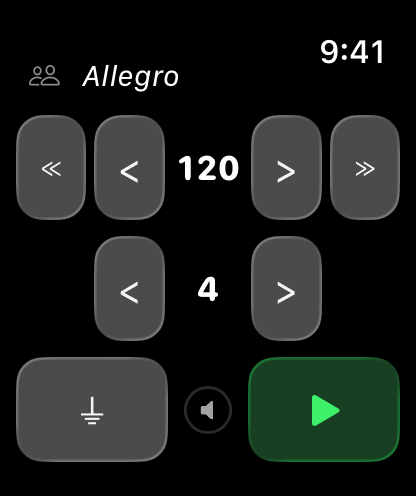
- Adjust BPM with the < > and ≪ ≫ buttons
- Tap the tempo name (e.g. "Allegro") to pick from a preset list
- Adjust beats per measure with the < > buttons on the second row
- Toggle haptic vibration with the ⏚ button (tap to turn off) or ⚡︎ button (tap to turn on)
- Use the Digital Crown to adjust volume
- Press the green play button to start, red stop button to reset
Beating with others
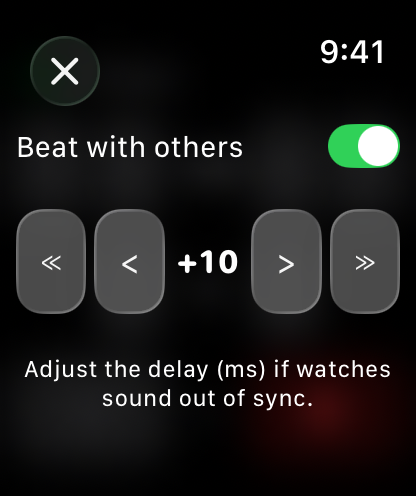
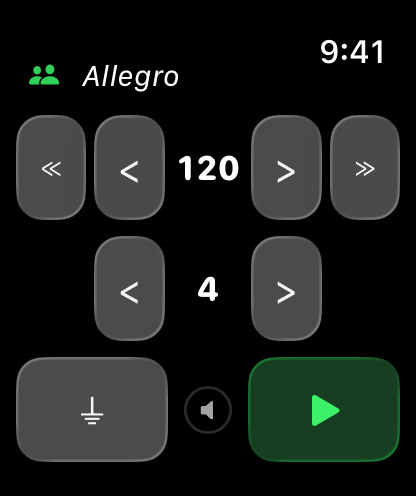
Tap the people icon at the top left, then switch on Beat with others. The beat is now taken from the clock rather than from the moment you pressed play, so any watches set to the same tempo and the same beats per measure play the same beats at the same time. There is nothing to pair, no network involved, and no setup — everyone just picks the same tempo.
With it on, play waits for the next beat instead of starting instantly. That is under a second at ordinary tempos, and up to four seconds at 15 BPM, where a beat is four seconds long.
If your watch sounds out of sync with the rest, adjust its delay on the same screen. The row works like the BPM row on the main screen: < and > move by 1 ms, ≪ and ≫ by 10 ms, up to 250 ms either way. A positive delay makes this watch click later, a negative one earlier.
The delay is saved separately for each audio output, so your speaker setting and your Bluetooth setting do not overwrite each other.
Tempo Reference
| Tempo | BPM Range | Feel |
|---|---|---|
| Larghissimo | 15 – 39 | Extremely slow |
| Largo | 40 – 59 | Very slow, broad |
| Larghetto | 60 – 65 | Rather slow |
| Adagio | 66 – 75 | Slow and stately |
| Andante | 76 – 99 | Walking pace |
| Andantino | 100 – 109 | Slightly faster than Andante |
| Moderato | 110 – 119 | Moderate |
| Allegro | 120 – 167 | Fast and bright |
| Presto | 168 – 199 | Very fast |
| Prestissimo | 200 – 240 | Extremely fast |
Legal
Privacy Policy
Last Updated: July 2026
Introduction
Welcome to Metronome Watch Special. We are committed to respecting and protecting your privacy. This Privacy Policy outlines the type of information we collect, or in this case, do not collect, and the methods we use to ensure your privacy.
Information We Do Not Collect
Metronome Watch Special is designed on a principle of zero data collection. We do not collect, store, use, share, or transfer any personal data from our users. The app operates entirely on your Apple Watch with no data processed or stored on any server.
Your metronome preferences are stored only on your Apple Watch so the app can restore them when reopened.
Third-Party Services
Metronome Watch Special does not integrate with any third-party services, such as analytics tools, advertising networks, or social media platforms. No data is shared with any third party.
Children's Privacy
Since we do not collect any data, we comply with all relevant regulations related to children's privacy, such as the Children's Online Privacy Protection Act (COPPA).
Changes to This Privacy Policy
We may update our Privacy Policy from time to time. We advise you to review this page periodically for any changes. Changes are effective immediately after they are posted on this page.
Contact Us
If you have any questions or suggestions about our Privacy Policy, do not hesitate to contact us at: support [at] hoshinosoftware [dot] com